
Appearance
I recommend DejaVu Sans Mono font – it covers a large amount of Unicode character set and is rather pretty.
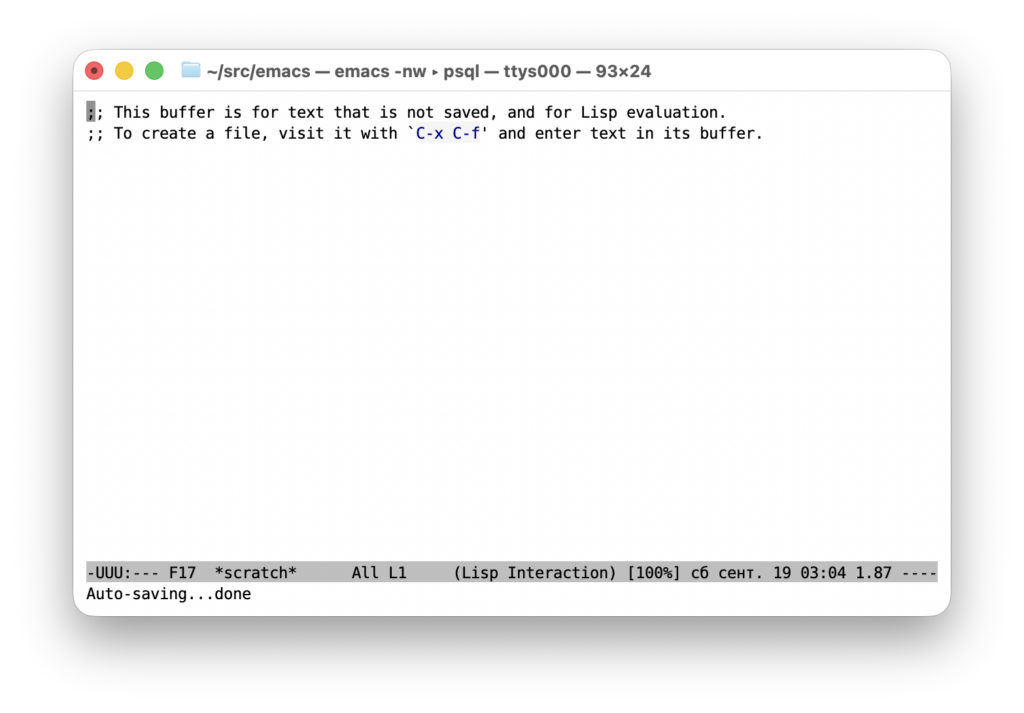
I use black on white (light-grey, actually). I don’t syntax-highlight text, because this distracts me. Everything that exists on the screen should have meaning. When you have some words in blue and some in green, that should mean different things, so it adds a layer of functional semantics on top of the text semantics. Sometimes it’s appropriate — like when appearance of a link in a web page is different from appearance of a simple text. But in the source code you already have that semantics defined by the language, so why duplicate it? Of course that’s not obvious when you’ve used an IDE through all of your career.
Actually, here’s an important part of my .emacs:
;; MEGA = Make Emacs Great Again
(setopt line-move-visual nil)
(setopt shift-select-mode nil)
(setopt text-quoting-style 'grave)
(setopt truncate-partial-width-windows nil)
(setopt visible-cursor nil)
(blink-cursor-mode -1)
(electric-indent-mode -1)
(electric-layout-mode -1)
(electric-pair-mode -1)
(electric-quote-mode -1)
(global-auto-revert-mode -1)
(global-eldoc-mode -1)
(global-font-lock-mode -1)
(global-visual-line-mode -1)
(menu-bar-mode -1)
(minibuffer-nonselected-mode -1)
(show-paren-mode -1)
(tab-bar-mode -1)
(tab-line-mode -1)
(transient-mark-mode -1)
(xterm-mouse-mode -1)
(when (display-graphic-p)
  (scroll-bar-mode -1)
  (tool-bar-mode -1))
And that’s how it looks (head start from *scratch*!):
Keyboard chords
I do some remapping on macOS: Command to Option, Option to Control, Control to Command. This is so that I get a symmetrical pair of Control and Option each. Only one Command is left, but no big deal.
There’s a scheme for chords which I find easy, convenient and universal: press all modifiers by one hand and the actual character by another. In the following, Alt means Option on macOS (remapped as above).
C-M-n is typed like this: Control-Alt with the left hand, n with the right. M-% is typed like this: Alt-Shift with the right hand, 5 with the left. When the target character is in the left half of the keyboard, press modifiers on the right, and vice versa. This approach also reduces the harm which repetitive strain does to your hands (press C-t with the left hand to understand what I mean).
If you look at the design of the “Space Cadet” keyboard (the Wikipedia says it influenced the design of Emacs), you won’t be surprised: the modifier keys are grouped together. By the way, it had seven modifier keys! Of which, “hyper” and “super” still can be used in Emacs — you can assign them to some keys and bind commands as usual.
Switching buffers
There’s a basic, but frequently overlooked feature in minibuffer called “future history”. This is suggestions which M-n skips through while in minibuffer. Its contents are the same as C-x C-b shows. And it’s incrementally-searchable via C-s! So you type C-x b, C-s, then some part of the buffer name – and skip through matching names with C-s until you see the desired buffer name.
Recursive dired
If you have many files in many directories in a (sub-)project (which is common for Java projects), you can use C-u s to add ‘-R’ ls option. With ‘dired-isearch-filenames’ set to ‘t’, you can then isearch files by name conveniently.
Info manuals
To switch between info manuals more convenient, assign for yourself numbers for frequently-used manuals, remember them and use prefix argument for C-h i. Like, M-2 C-h i will always open elisp manual, M-3 C-h i – manual for cc-mode etc.
